
Key takeaways
- Check placement, appearance and unseen surfaces separately; one matching camera view does not establish the whole shape.
- GenIA is research software with hardware and licensing requirements that must be reviewed before use.
- Keep a genuine held-out photograph distinct from a synthesized orbit view.
Review the input match, then inspect what the input cannot show
To evaluate a GenIA reconstruction for a game-prop workflow, first compare its placement and visible markings against the source photo. Then inspect a side view and the back, recording which surfaces were actually observed. Keep licensing and engine-readiness as separate release gates. The checklist below is an evaluation plan, with a small synthetic lab you can reproduce; it is not a report of running GenIA.
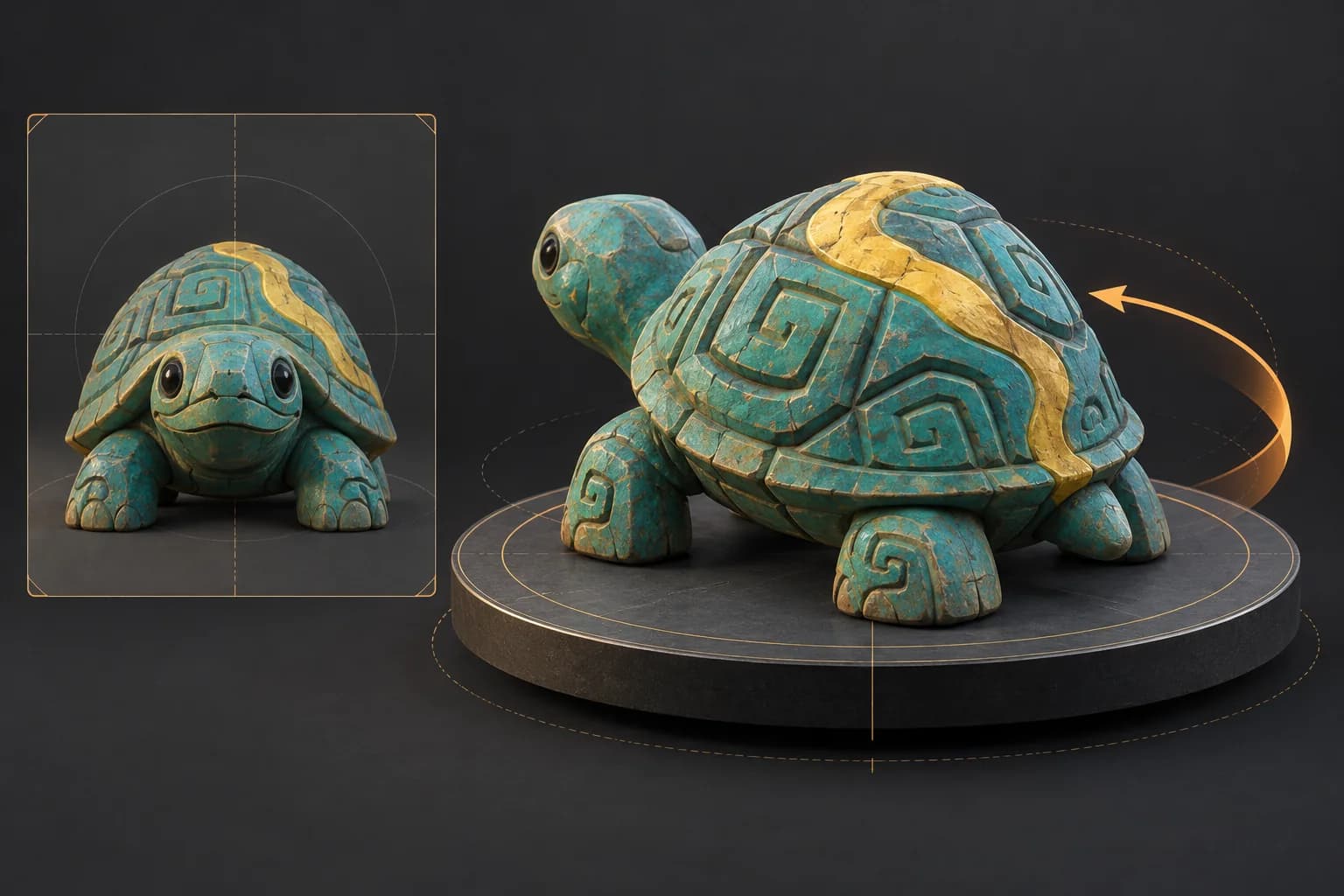
GenIA was introduced in an October 8, 2026 preprint. It aligns a frozen SAM 3D Objects model with image observations during inference. The useful question for artists is whether the reconstructed object preserves the evidence in their reference, including its appearance and placement.[1]
Check the research requirements before planning a production asset
The public setup requires conda, an NVIDIA GPU and the CUDA 12.8 toolkit. Model downloads also require accepting the SAM 3D Objects license on Hugging Face. The repository describes single-image, static multiview and monocular-video demos, with meshes, Gaussians and poses among the outputs. We did not install this stack or measure its speed, memory consumption or reconstruction quality.[2]
GenIA lists CC BY-NC 4.0 for the project, and its dependency inventory has additional terms, including noncommercial components. Creative Commons describes the NC restriction as excluding commercial use of the licensed material. Do not treat public source availability as commercial clearance. Review the code, weights, input-image and intended-output permissions separately; this article does not determine the legal status of your particular generated asset.[2][4][5]
Use a three-view review sheet for one distinctive prop
Choose a reference you have permission to use and a prop with a distinctive marking: an off-center stripe, a clasp or one colored panel. Before comparing images, record the intended scale and orientation. A symmetrical silhouette can make a misplaced marking easy to miss. Use the following review sheet as a proposed art-direction workflow, not as a substitute for a model-quality benchmark.
- 1
Input camera: placement
Match the camera framing before judging the asset. Record whether the silhouette, object center and apparent size agree. If they do not, distinguish a placement problem from a shape problem before editing the mesh.
- 2
Input camera: appearance
Check the location of the distinctive marking relative to real landmarks. Record which side it belongs on, whether it crosses an edge, and where it stops. Avoid approving a result just because its overall color palette looks similar.
- 3
Side and back: evidence coverage
Orbit the result and label each surface observed, partly observed or inferred. Compare with an additional real photograph if you have one. Without one, assess usefulness for the game brief, but leave resemblance to the real hidden surface unverified.
The paper explicitly separates geometry, placement and appearance. It also reports remaining limits: coarse geometry is not directly grounded in every observed cue, rotation stays prior-driven, and errors in masks, depth or cameras can affect the result. Optional test-time refinement adjusts object-specific quantities and lightweight adapters; a frozen foundation model does not mean the entire process performs no optimization.[1]
Reproduce a case where the front matches but the shape differs
Our downloadable lab constructs two simple voxel props from explicit coordinates. Both have the same front-facing footprint; the second extends farther behind part of that footprint. A binary orthographic projection cannot see that added depth from the front. Turning the camera to the side exposes it. Nothing in this lab is reconstructed by an AI model.
Intersection-over-union divides the number of occupied cells shared by two projected masks by the number occupied by either. Read the generated report alongside the fixture coordinates and tests. The front score alone cannot distinguish these deliberately different shapes. This is a concrete counterexample to using one silhouette match as proof of complete geometry, not a predicted failure rate for GenIA.
The measured front masks share all 30 occupied cells, so IoU is 30/30 = 1.00. From the side, the intersection is 18 cells and the union is 30, giving 0.60. Shape A contains 60 voxels and shape B contains 108. These numbers describe only the authored fixtures at fixed scale and origin.
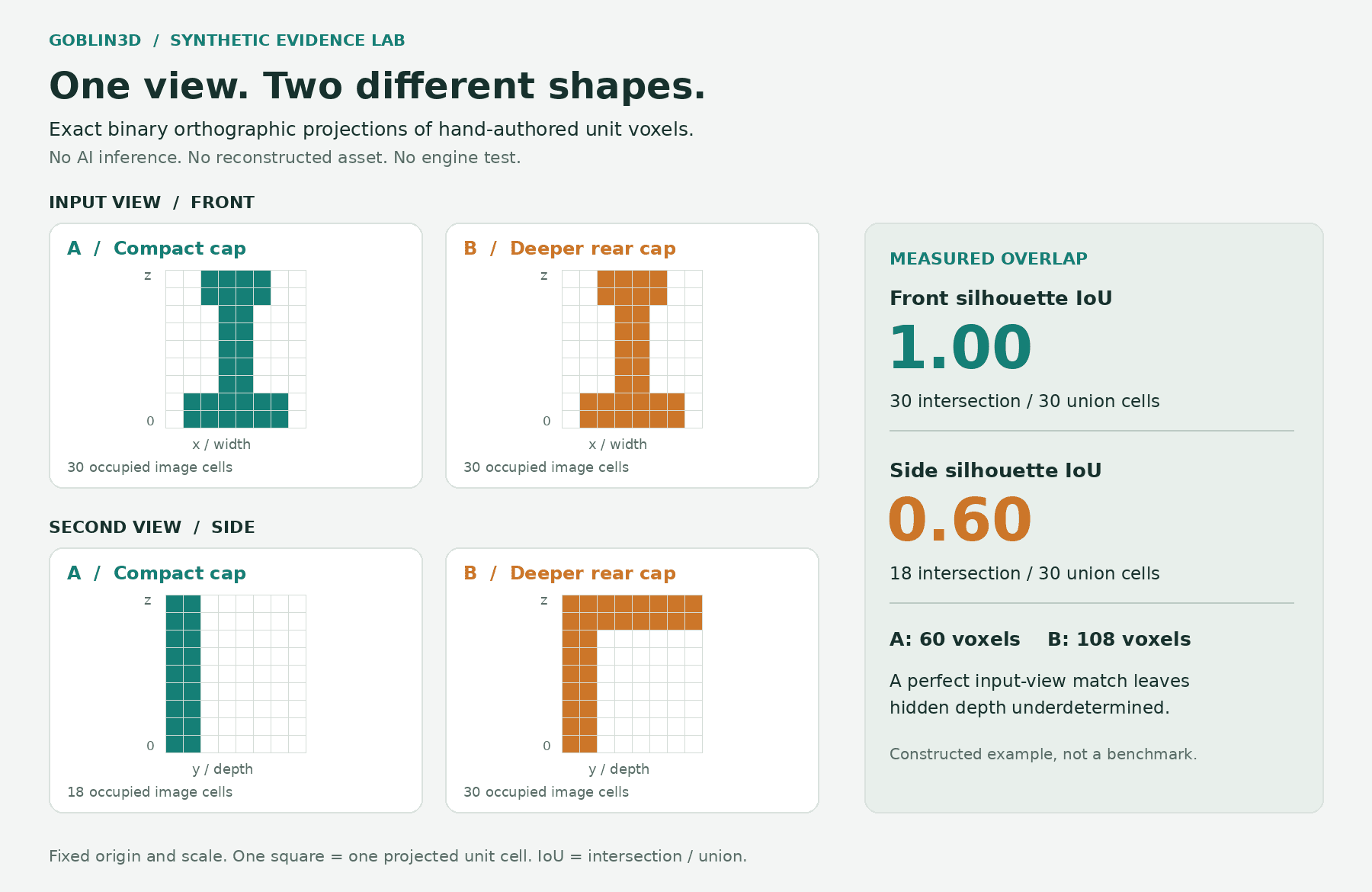
The limitation is intentional: the lab omits perspective, texture, shading, learned priors and real photographs. It establishes only an ambiguity in this synthetic projection setup. It does not show that GenIA produces either shape, nor that a second view resolves every ambiguity. Use it to explain why an asset review needs explicit evidence coverage.
Keep diagnostic renders separate from novel-view evidence
GenIA's configuration reference documents intermediate renders and metrics, final input-view renders, canonical GLB meshes and pose records. Its demo can retain intermediate outputs with --no-minimal-outputs. Compare diagnostic images while preserving the same input and configuration; changing multiple settings at once makes attribution harder.[3]
The custom multiview dataset has no built-in held-out split. A synthesized novel view is a rendered prediction, not another observation of the real object. Keep the original photographs, input selection and any genuinely withheld photo together with your inspection notes. Record "no independent view available" when that is the case.[3]
Make export a separate decision
A file appearing in a meshes folder is only a handoff point. Before treating a prop as ready for your game, review its actual geometry, material setup, dimensions and behavior in your target workflow. The silhouette lab and this research review do not test any of those properties. Use our mesh-budget and material-channel guides for those separate inspections.
If you are starting from an original concept instead, Goblin3D's public Image to 3D workflow accepts a visual reference. Use the same input-side-back review discipline after generation: inspect the recognizable features and the inferred surfaces before export.[6]
Evidence used
- Reproduce the silhouette ambiguity lab
Original fixture definitions, projection method, reproduction commands and limitations; no model output.
- Inspect the measured synthetic projections
Machine-readable silhouette intersections and unions for the two authored shapes. Separate from GenIA performance.
- Download the complete silhouette lab
Source, original shapes, report, diagram and tests. Reproduce the measurements without an AI model.
Sources
- 1.GenIA paper, version 1 — GenIA authors. Accessed 2026-10-10.
- 2.GenIA setup and output overview — GenIA authors. Accessed 2026-10-10.
- 3.GenIA pipeline and output configuration — GenIA authors. Accessed 2026-10-10.
- 4.GenIA third-party component license inventory — GenIA authors. Accessed 2026-10-10.
- 5.CC BY-NC 4.0 license summary — Creative Commons. Accessed 2026-10-10.
- 6.Goblin3D public features — Goblin3D. Accessed 2026-10-10.
Start with a reference you can inspect
Explore Goblin3D Image to 3D, then review the visible details and inferred surfaces against your game brief.
Explore Image to 3DRelated Goblin3D guides and tools
Sources, product facts, and original evidence were checked before publication.