
Key takeaways
- Compare the loop boundary with nearby sample changes; identical first and last values are neither necessary nor sufficient for a useful loop.
- Audit stereo channels separately and inspect silence, drift and changes inside the clip.
- Choose the crossfade curve for the overlapping material, reserve headroom, and update duration and loop points after editing.
Inspect the boundary before choosing a fade
For a repeating game ambience clip, inspect the wrap from its last sample frame back to its first, check every channel, then audition several repetitions. A crossfade is an editing option, not a quality certificate. The same checks are useful whether the source was recorded, synthesized or generated: first establish what the actual audio file contains.

This guide provides a small downloadable lab with synthetic PCM signals. Its results concern sample arithmetic, file structure and a specific crossfade implementation. They do not establish that a loop sounds seamless, that an AI model creates good ambience, or that a game engine will reproduce the file without additional processing.
Start with frames, channels and the real sample rate
Python’s wave module exposes the channel count, sample width, frame count and frame rate of PCM WAV files. A frame is the time step across channels: a stereo file with 48,000 frames at 48,000 frames per second lasts one second, not two. The lab uses 16-bit PCM and rejects unsupported input rather than guessing how to decode it.[4]
Use half-open bounds when reasoning about a selected region: start is included and end is excluded. Its frame count is end minus start. Preserve the original, record the selection and inspect the exported file again; an editor’s rounded time display is not a complete sample-level record.
For Web Audio, loopStart and loopEnd describe positions in the buffer, with the end excluded. The specification also allows subsample endpoints and interpolation. A frame-aligned point is converted to seconds using the buffer’s own sample rate. This documented API behavior is separate from the lab’s offline WAV measurements.[1]
A zero endpoint difference is not a seamlessness test
The simplest boundary metric is the first sample minus the last sample, measured separately in each channel. Its absolute size is useful to inspect alongside ordinary adjacent-sample changes. A periodic discrete waveform usually does not store a duplicate copy of its first sample at the end: the next sample in the cycle supplies the continuation. Demanding exact endpoint equality can therefore reject a valid cyclic sequence.
The reverse mistake is just as important. Equal endpoints can surround a sudden slope change, a silence gap or a conspicuous event elsewhere in the clip. A scalar boundary score cannot see the whole listening experience. The lab deliberately includes counterexamples, not a universal threshold for good game audio.
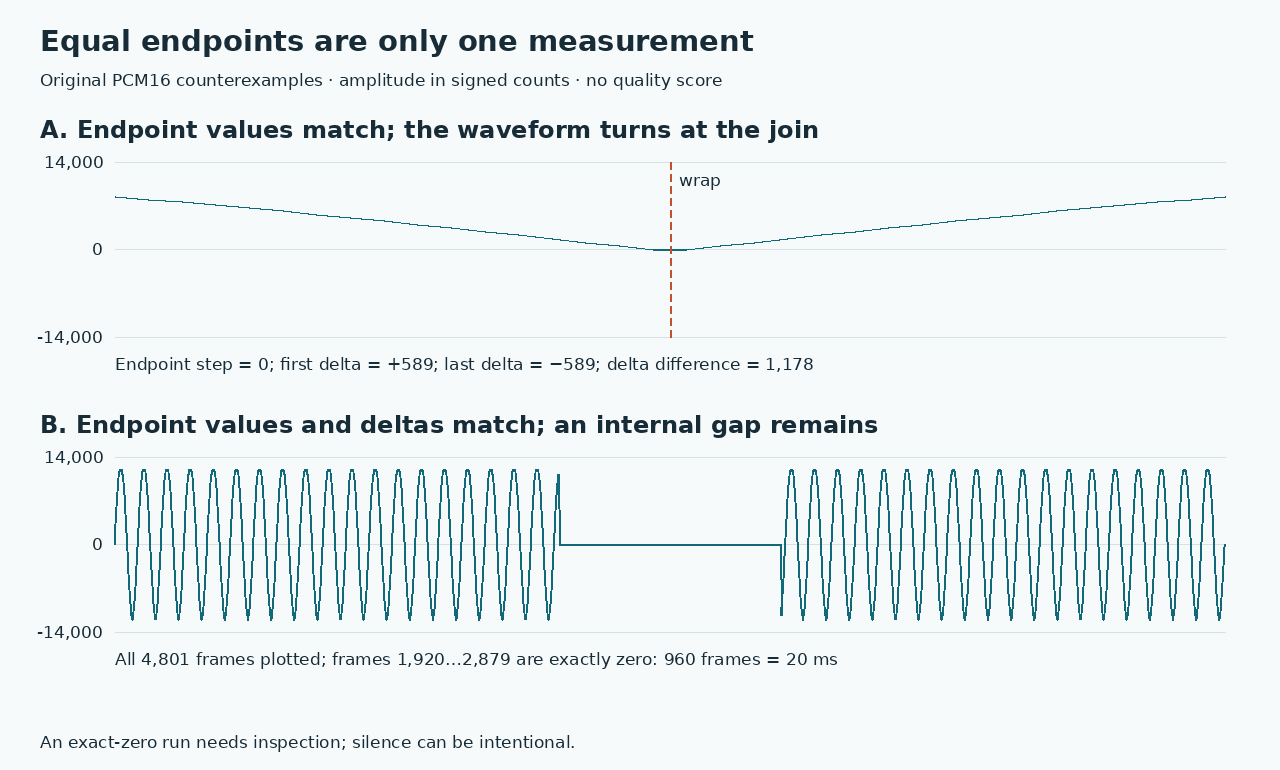
What the original PCM fixtures actually show
All fixtures below use 48 kHz, signed 16-bit PCM. “Internal p95” is the nearest-rank 95th percentile of absolute adjacent-sample changes inside the file, excluding its wrap. Counts are numerical sample units; none of these values is an audibility threshold. The downloadable report contains the full per-channel measurements.
| Fixture | Wrap step | Internal p95 | What it reveals |
|---|---|---|---|
| Periodic sine | 1,130 | 1,126 | The wrap equals its largest ordinary adjacent step; nonzero endpoints need not signal a broken cycle. |
| Discontinuous ramp | 20,000 | 5 | The boundary change is far larger than the changes inside this fixture. |
| Equal-endpoint cusp | 0 | 587 | First/last internal deltas are +589/−589; matching values hide a slope change. |
| Equal-endpoint gap | 0 | 751 | A 960-frame exact-zero run remains inside the file: 20 ms at 48 kHz. |
A separate stereo fixture pairs opposite ramps. Averaging its channels produces zeros, concealing the −20,000 and +20,000 boundary steps present in the individual channels. That constructed case is why the inspector retains per-channel results rather than treating a mono summary as a stereo acceptance test.
Pick a crossfade curve for the overlapping material
A crossfade overlaps two regions while reducing one and increasing the other. Audacity distinguishes constant-gain and constant-power fades, and warns that power-shaped fades can increase peak level. Its explanation of equal-power fades specifically discusses uncorrelated material. Neither curve guarantees the best result for every loop.[2][3]
The lab compares linear weights, 1−t and t, with equal-power weights, cos(πt/2) and sin(πt/2). At the midpoint, two identical values of 0.9 remain 0.9 with a linear blend; the equal-power formula produces about 1.273. Two opposite values cancel at that midpoint under either curve. These are algebraic examples of correlation and headroom, not loudness measurements or a recommendation to normalize every file.
Keep the blend in floating point until the export decision. A peak beyond the permitted PCM range needs an explicit gain or editing decision, not silent clipping. Inspect the resulting overlap as well as the relocated wrap. A small boundary step can coexist with a level swell or cancellation inside the transition.
An overlap changes the loop’s length and starting point
The lab’s circular edit takes an N-frame clip and an M-frame overlap, blends the tail into the head, then concatenates the untouched middle followed by that blend. The result has N−M frames. Its first frame is the original frame M: the loop’s phase origin has moved. This is a defined editing policy, not a claim that all audio editors use the same construction.
That distinction matters when the sound must align with a fixed beat grid or a timed animation. Do not retain the old duration or trigger schedule after shortening the audio. If an exact loop period is required, choose an editing method designed around that constraint and verify the final export instead of silently accepting this lab’s shorter result.
In the actual ramp fixture, a 480-frame overlap changes 4,800 frames to 4,320: 100 ms becomes 90 ms. Both implemented curves reduce the wrap step from 20,000 to 4 PCM16 counts, while the internal p95 rises from 5 to 33 for linear and 34 for equal-power. The smaller wrap measurement therefore describes a tradeoff within this constructed edit, not an across-the-board quality improvement.
Reproduce the lab, then make the listening decision
Download and unpack the lab, read its README, run the supplied tests, and regenerate the evidence. Compare the regenerated WAV bytes and numeric report with the included artifacts. The source code makes the measurement definitions and the crossfade ordering inspectable; the fixtures are small and intentionally simplified.
- Keep a source copy and verify that you have permission to use the audio in the game.
- Check the exported channel count, rate, length, peaks and internal gaps, then inspect the selected boundary in each channel.
- Compare a direct loop with your proposed edit. Check the entire overlap, not just the first and last sample.
- Audition several repetitions at a comfortable level, including the stereo and intended mono playback conditions.
- Test the final encoded asset in the actual playback path; file-level arithmetic does not prove codec or runtime behavior.
Use these measurements to locate questions, not to replace listening. The lab does not measure perceived clicks, spectral continuity, true peaks between samples, spatial coherence or repetition fatigue. It also does not run an audio-generation model or test any particular game engine. A technically tidy boundary can still be the wrong ambience for a scene.
Evidence used
- Download the original audio-loop lab
Synthetic WAV fixtures, original inspector and crossfade implementation, tests, numeric reports and reproduction instructions.
- Read the lab contract and limitations
Exact definitions of sample-boundary, overlap-length and per-channel checks; no perceptual pass/fail claim.
- Inspect the measured fixture results
Reproducible observations for authored PCM fixtures and crossfade comparisons.
Sources
- 1.Web Audio API: loop boundaries and playback — W3C. Accessed 2026-10-09.
- 2.Crossfade Tracks: gain, power and peak level — Audacity. Accessed 2026-10-09.
- 3.Fade and Crossfade: uncorrelated sounds — Audacity. Accessed 2026-10-09.
- 4.Read and write PCM WAV frames — Python Software Foundation. Accessed 2026-10-09.
Keep the whole scene in view
Explore Goblin3D’s visual-asset tools while you plan the sound and visuals for your game.
Explore visual-asset toolsRelated Goblin3D guides and tools
Sources, product facts, and original evidence were checked before publication.