
Key takeaways
- Use the image dimensions and orientation that the boxes actually describe; width and height are not interchangeable.
- Parsed Florence-2 boxes are pixel coordinates, so do not normalize them a second time.
- Round, clip and reject inputs deliberately, then inspect each rectangular crop before using it as a reference.
Keep each box attached to the image it describes
To turn Florence-2 detections into useful game-reference crops, take the parsed pixel boxes, keep their original image frame, and apply an explicit rounding-and-clipping policy. Inspect the resulting rectangles before handing them to an artist. A rectangle can isolate a reference area, but it does not remove that area’s background or decide whether the object is suitable for your game.
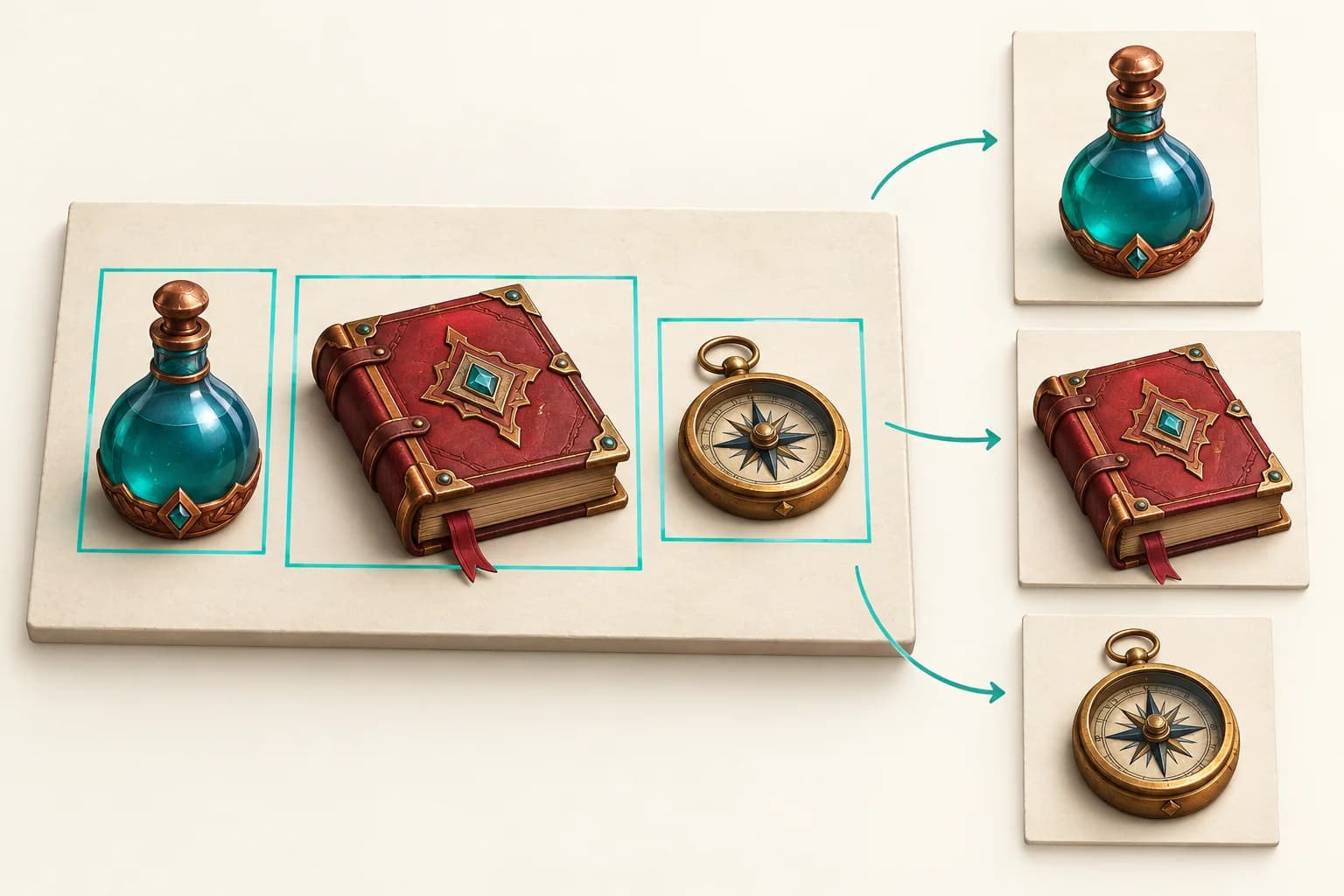
Microsoft’s public Florence-2-base resource documents object detection through the <OD> task. Its example returns bboxes paired with labels and supplies image_size=(image.width, image.height) to post_process_generation. This guide examines that documented handoff using an established resource, not a newly announced model or a claim of game-art recognition accuracy.[1]
Separate location tokens from already parsed pixel boxes
The pinned Microsoft processor uses 1,000 bins per axis and decodes a bin index using its center: (bin + 0.5) × axis length / 1,000. It keeps x values tied to width and y values tied to height. That source-level detail explains why a parsed box may contain fractional pixels.[2]
After post_process_generation has decoded the prediction, its boxes are already expressed in the supplied image dimensions. Do not multiply them by width and height again, and do not divide them by 1,000 as though they were still token indices. Preserve the raw prediction separately if you need to audit parsing.[2]
For example, an x-bin value of 499 on a 640-pixel-wide image maps to 319.68, not 499 pixels. The same bin on a 320-pixel-wide image maps to 159.84. Those are two coordinate frames for the same relative position. The formula alone cannot tell you which image your downstream cropper opened.
Normalize orientation before creating detections
A camera image can carry EXIF instructions to rotate or mirror its stored pixels. Pillow documents exif_transpose() for applying that orientation and removing the tag. Normalize the image before detection, then retain that exact oriented image for cropping; applying orientation only after boxes were obtained changes the coordinate frame.[5]
Use width and height from the actual image object, not from a thumbnail’s CSS size or a remembered export setting. A square test image can hide a swapped-axis mistake. Include a wide and a tall image when checking a crop pipeline, and keep an asymmetric object away from the center so incorrect transforms are visible.
For a full-frame, same-orientation resize, box coordinates can be scaled with the image. That does not cover a letterboxed, center-cropped, rotated or translated input. Padding introduces an offset; cropping changes the origin. Record those transforms explicitly rather than trying to infer them from two dimensions. Even equal aspect ratios do not prove that two files show the same framing.
Choose integer edges deliberately
Pillow defines rectangles by left, upper, right and lower coordinates, with the image origin at the upper left and coordinates referring to pixel corners. It returns a rectangular region for Image.crop(). The lab adopts integer, half-open bounds: the output width is right minus left, and height is bottom minus top.[3][4]
The lab’s policy is to reject malformed, nonfinite or reversed boxes first; require the unpadded box to intersect the image; then apply any chosen context margin, round the left/top edges down and right/bottom edges up, and clip to the image boundary. This is an explicit reference-preparation policy, not a claim about the processor’s preferred crop settings.
A margin adds context around the selection. It cannot recover pixels beyond the source image or repair a wrong detection. Store the requested margin and actual clipped bounds so a reviewer can see when a crop reaches the image edge. Reject an entirely outside box instead of allowing a large margin to turn it into an unrelated valid region.
Reproduce the coordinate lab
The original download contains the crop adapter, executable tests, authored synthetic PNG images, input boxes and machine-readable observations. It runs offline and does not import a model library. The evidence is intentionally small enough to inspect each rectangle and verify which pixels were retained.
python3 -m unittest -v test_crop_boxes.py
python3 build_evidence.py --check
python3 crop_boxes.py < artifacts/fixtures.jsonThe recorded Python 3.12.14 run passed 72 tests, and rebuilding reproduced all 15 evidence files byte-for-byte. A separate Pillow 12.3.0 check decoded all 13 PNGs and matched all seven cropped images against Pillow’s crop of the corresponding source and bounds. These checks cover the fixture and adapter, not a Florence inference pipeline.
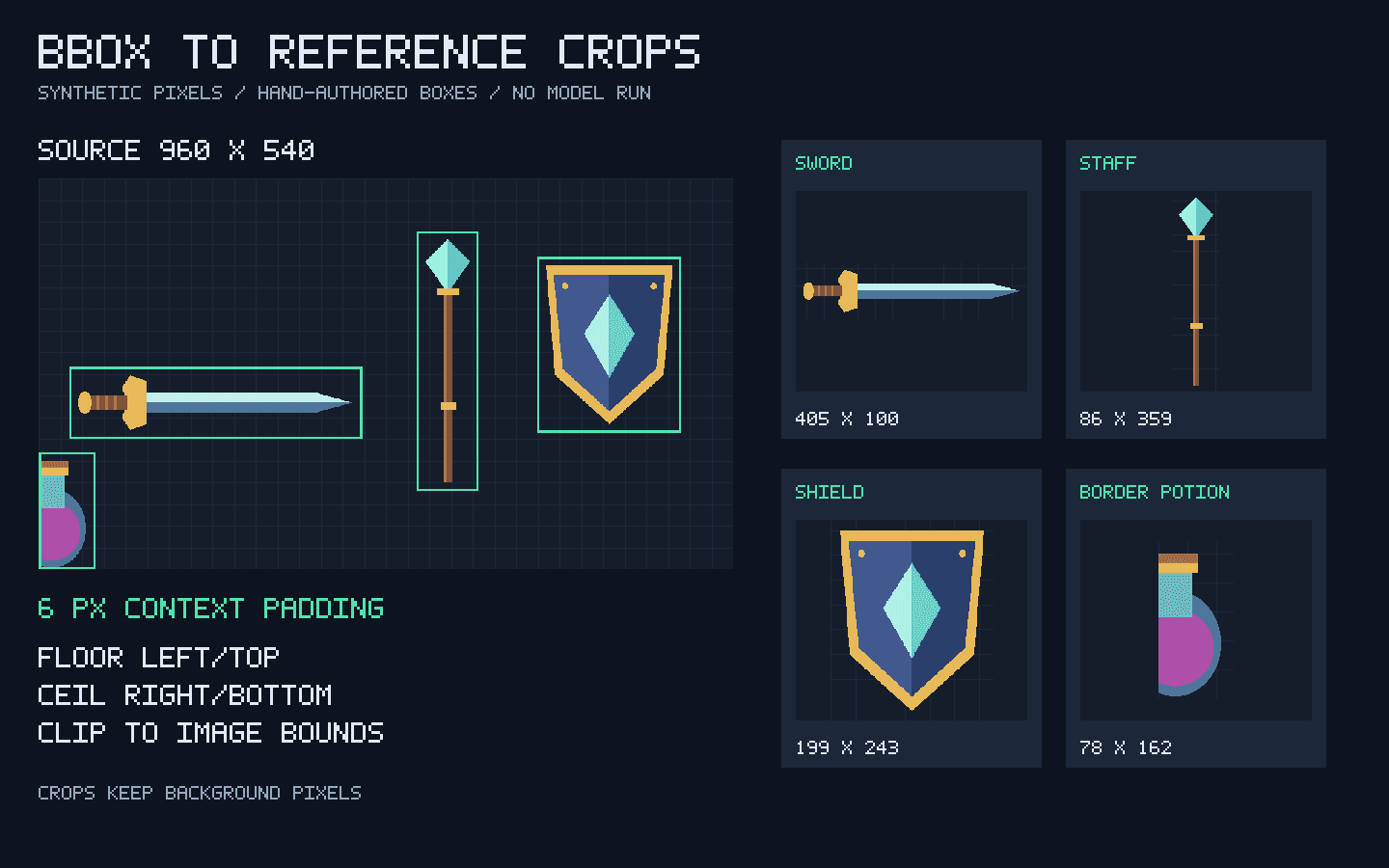
| Fixture | Clipped crop: left, top, right, bottom | Export width × height |
|---|---|---|
| Sword | 42, 260, 447, 360 | 405 × 100 |
| Staff | 522, 73, 608, 432 | 86 × 359 |
| Shield | 689, 108, 888, 351 | 199 × 243 |
| Border potion | 0, 378, 78, 540 | 78 × 162 |
The wide fixture accepts four boxes and rejects five: an entirely outside rectangle, zero width, reversed x edges, a boolean coordinate and a text coordinate. The separate tall fixture is 360×720 and produces a 66×616 staff crop with the same padding policy. These authored cases expose different shape and boundary conditions without suggesting model accuracy.
The resize example halves the full 960×540 image to 480×270. Its sword box [48.25, 266.5, 440.75, 353.25] becomes [24.125, 133.25, 220.375, 176.625]. Without padding, outward rounding gives [24, 133, 221, 177], a 197×44 crop. Reusing the original coordinates against the smaller image instead yields a clipped 393×4 strip. Both pass simple numerical bounds handling; only the remapped box selects the sword.
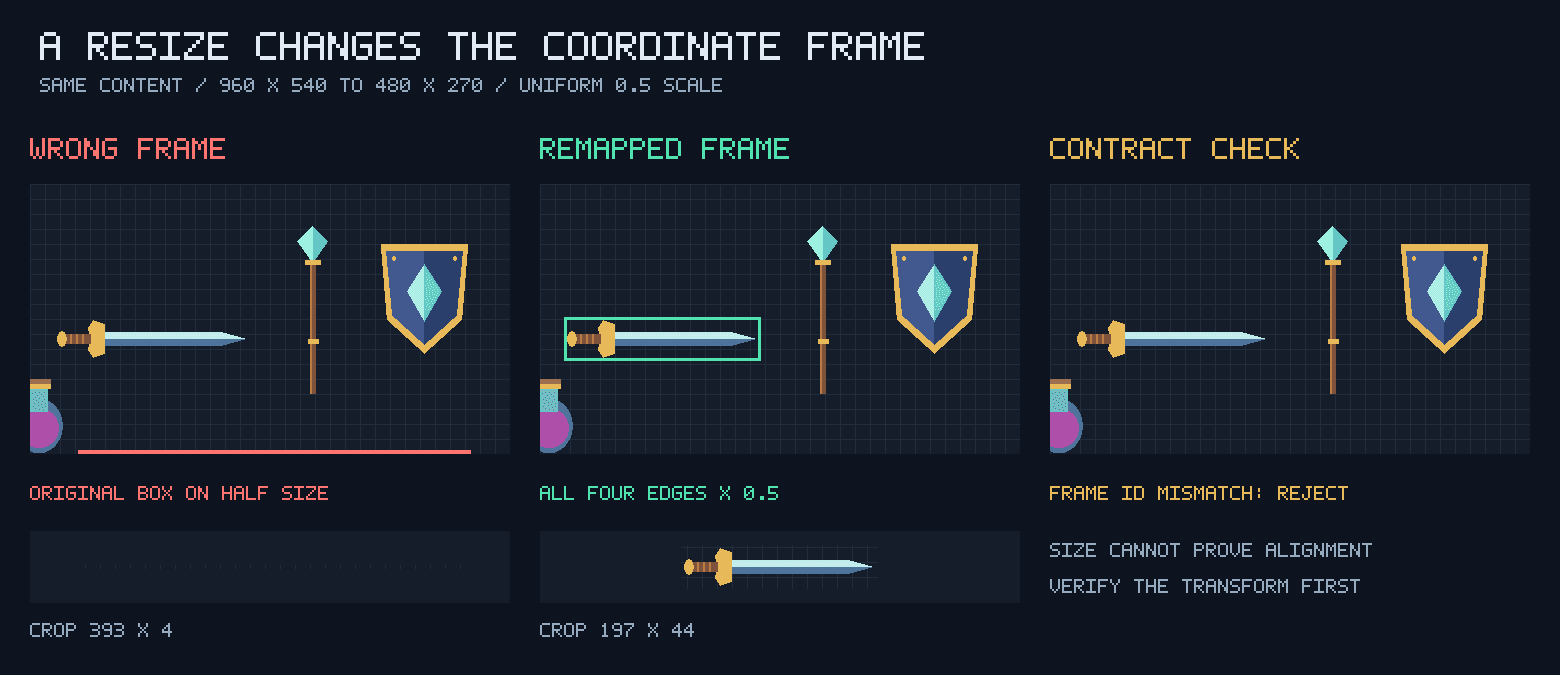
The adapter requires matching declared frame IDs and an explicit full-raster resize mapping. That is a useful guard against accidental mix-ups, not proof of image identity: the caller still has to supply truthful provenance. It intentionally does not guess a letterbox offset, transform OCR quadrilaterals, infer a segmentation mask or choose the correct detection for an artist.
Review the crop before reusing the reference
Start with the uncropped reference and compare it with the exported rectangle. Check that the selected object is present, that narrow accessories are not clipped, and that nearby objects or text have not become misleading context. Keep the source-image identity, dimensions, orientation, original float box and final integer bounds together.
A label is a model’s description, not a guaranteed asset identifier. Two detections can share a label, and an unexpected label should never become an unchecked output path. Prefer stable local IDs for filenames and preserve labels as reviewable metadata. The lab uses fixed fixture names rather than allowing predicted text to select files.
For an inventory cutout, crop review is only the first stage. A rectangular export retains its background; segmentation and alpha preparation need a separate mask workflow. A reference crop also carries no rig, collision shape, UV layout or animation data. Decide what the next tool needs instead of treating the rectangle as a finished asset.
The model card currently labels Florence-2-base MIT, while the inspected processor source file carries an Apache 2.0 header. Keep those resource-level notices distinct and check the exact files you adopt. They also do not establish permission for your source artwork; this article does not assess reuse rights. Keep private or unlicensed boards out of a workflow you cannot approve for those materials.[1][2]
A useful acceptance test is whether another artist can open the original, reproduce the same bounds and pixels, and understand what still needs judgment. Keep the crop editable and its provenance visible, especially when it becomes the reference for later 2D or 3D work.
Evidence used
- Download the complete reference-crop lab
Original adapter, tests, synthetic images and boxes, reproducible outputs, source provenance and README; no model weights or third-party art.
- Read the coordinate contract
Frame identity, orientation, allowed resize mapping, crop policy, reproduction commands and limits.
- Inspect the crop adapter
Standard-library validation and crop-bound calculation for post-processed object-detection boxes.
- Audit the observed crop results
Accepted and rejected boxes, integer bounds, source dimensions, resize comparison and exact artifact hashes.
Sources
- 1.Florence-2-base task formats and model card — Microsoft. Accessed 2026-10-05.
- 2.Pinned Florence-2 coordinate postprocessor — Microsoft. Accessed 2026-10-05.
- 3.Pillow coordinate system and image orientation — Pillow contributors. Accessed 2026-10-05.
- 4.Pillow rectangular image cropping — Pillow contributors. Accessed 2026-10-05.
- 5.Pillow EXIF orientation normalization — Pillow contributors. Accessed 2026-10-05.
Prepare a clearer asset reference
Use the related guides to decide which reference, mask or view set your next asset step needs.
Explore the workflow libraryRelated Goblin3D guides and tools
Sources, product facts, and original evidence were checked before publication.