
Key takeaways
- Start with 4-way sprites when diagonal facing does not change aiming, combat readability, or character identity; move to 8-way when it does.
- Four-way visuals can still accompany diagonal movement because movement vectors and displayed facing states are separate decisions.
- With equal nearest-facing sectors, 4-way has a theoretical 45-degree worst-case mismatch and 8-way reduces it to 22.5 degrees.
- For Goblin3D's current default 4-frame Idle and 8-frame Walk, the directional cell count is 48 for 4-way and 96 for 8-way.
- Stardew Valley documents down, up, and mirrored left/right walking groups, while DOOM's released renderer supports eight viewer-relative sprite rotations—evidence that direction count follows the camera and gameplay problem.
Choose 4-way sprites when diagonal facing does not change aiming, combat readability, or the character's identity. Choose 8-way when a diagonal pose carries information the player needs. Both systems can support diagonal movement. The practical tradeoff is that 8-way halves the theoretical worst-case facing mismatch, from 45 degrees to 22.5 degrees, while doubling the directional animation cells for the same motions and frame counts.
The quick decision: 4-way or 8-way?
| Question | Choose 4-way | Choose 8-way |
|---|---|---|
| Does diagonal facing change gameplay? | No. Movement can snap visually to the nearest or last cardinal facing. | Yes. Aim, attacks, shields, cones, or interactions must read diagonally. |
| What is the production priority? | Ship more characters or motions with a smaller direction budget. | Spend more cells and review time on closer facing coverage. |
| How prominent is the character? | Small on screen, retro-styled, or visually simple. | Large on screen, highly asymmetric, or carrying direction-specific gear. |
| What input dominates? | Cardinal keyboard movement or deliberately chunky direction changes. | Frequent keyboard diagonals, twin-stick aim, or analog movement. |
| Where is the project? | Prototype, game jam, vertical slice, or content-heavy production. | The core loop is proven and diagonal readability failed a test. |
This is a production recommendation, not a file-format restriction. The useful question is whether the extra diagonal artwork communicates something worth its ongoing generation, cleanup, review, and maintenance cost.[1][2]
Movement directions are not sprite directions
A 4-way character can still move diagonally because movement vectors and displayed animation states are separate choices. Official Unity and Godot documentation both describe directional animation controls independently from the full range of possible movement input. The exact mapping remains a game-design decision rather than a requirement to author a unique sprite for every movement angle.[1][2]
For a nearest-sector mapping, divide the full circle by the number of facings. Four facings create 90-degree sectors; eight create 45-degree sectors. The farthest an input can be from its nearest facing is half a sector, so the theoretical worst case is 45 degrees for 4-way and 22.5 degrees for 8-way. This is geometry, not a user study, and it assumes evenly spaced directions.
sector_count = use_eight_way ? 8 : 4
sector_size = 360 / sector_count
facing_index = round(input_angle / sector_size) mod sector_count
if input_is_zero: keep_last_facing()What Stardew Valley and DOOM show about direction budgets
Stardew Valley is a concrete four-way-style reference. Its farmer-sprite documentation groups walking into down, left/right, and up animations, and states that the left and right animations are mirror images. That gives the character four displayed facings while requiring three authored walking-view groups. The official press page also describes an open-ended RPG with extensive character customization. This does not prove why the developer chose the layout or that four-way is universally better; it shows that a widely recognized, customization-heavy game can remain readable without unique diagonal walking poses.[5][4]
DOOM demonstrates a different reason to keep eight views. The released id Software renderer accepts sprite rotations 1 through 8, requires all eight slots when a frame uses rotations, and chooses the displayed rotation relative to the player's view. This is a viewer-relative billboard system rather than a top-down movement map, but it is a famous, concrete example of eight directional views solving a camera-coverage problem.[6]
What actually doubles in an 8-way set?
Use the formula directional cells = direction count × the sum of frames across motions. Goblin3D's current defaults are a 4-frame Idle and an 8-frame Walk, for 12 frames per direction. That produces 4 × 12 = 48 cells in a 4-way set and 8 × 12 = 96 cells in an 8-way set. The calculation counts grid cells; it does not measure compressed bytes or runtime memory.[3]
| Metric | 4-way | 8-way | Method |
|---|---|---|---|
| Direction sectors | 4 | 8 | Chosen facing count |
| Sector width | 90° | 45° | 360° ÷ direction count |
| Worst nearest-facing mismatch | 45° | 22.5° | Half of one sector |
| Idle cells at 4 frames | 16 | 32 | Directions × 4 |
| Walk cells at 8 frames | 32 | 64 | Directions × 8 |
| Default Idle + Walk total | 48 | 96 | Directions × (4 + 8) |
The art and review surface therefore doubles when every direction receives a distinct frame sequence. Actual PNG or WebP size, generation time, and price depend on the produced sheets and current product policy. They must be measured rather than inferred from the cell count.
What a directional comparison can—and cannot—show
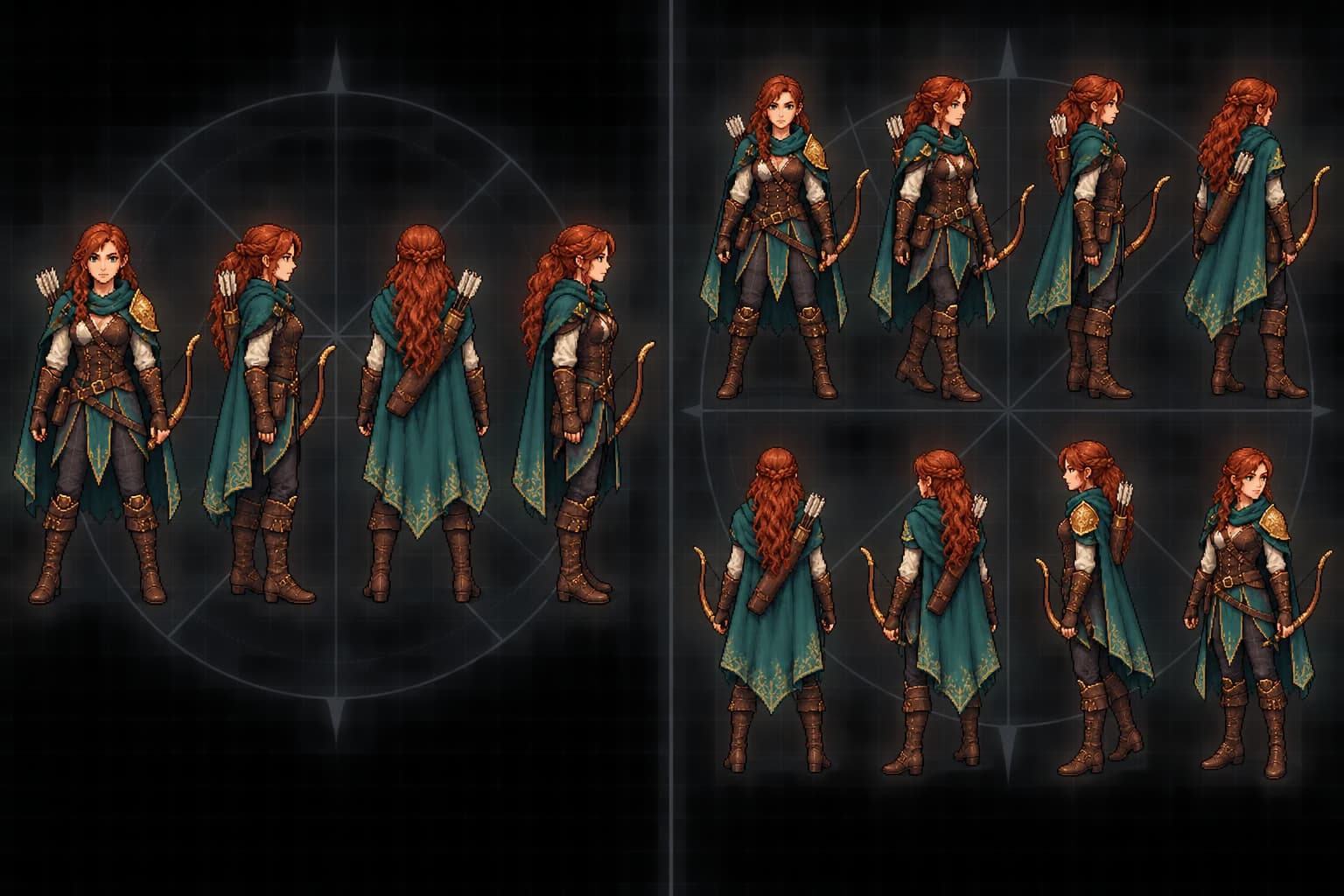
The comparison below keeps one adult fantasy ranger, costume, scale, and framing consistent while grouping four cardinal views on one side and eight evenly spaced views on the other. It is an editorial concept illustration for reading direction coverage and asymmetric details. It is not a Goblin3D output, an exported animation sheet, a Unity or Godot scene, or a runtime benchmark, so it cannot prove product consistency, animation continuity, import speed, memory use, or frame-rate performance.
Choose 4-way when scope matters more than diagonal facing
- Diagonal movement is allowed, but the player does not aim, block, or interact differently on a diagonal.
- The character is small on screen, visually symmetric, or intentionally uses a chunky retro direction change.
- You need more characters, weapons, outfits, or motions from the same production budget.
- You are validating the core loop and do not yet know whether diagonal posing changes player decisions.
- Cardinal keyboard input dominates and a deliberate tie rule for diagonal key combinations looks acceptable in play.
Do not hide the tie rule. When left and up are pressed together, choose nearest angle, dominant axis, last facing, or a documented priority. A stable rule usually looks better than a technically clever rule that changes every frame.
Choose 8-way when diagonals carry player-facing information
- Attacks, aim lines, shields, vision cones, or interactions need to align with diagonal input.
- Twin-stick or analog movement makes the 45-degree gaps between cardinal facings repeatedly visible.
- The character has a bow, shield, one-sided armor, readable hands, or another asymmetric silhouette that makes a reused cardinal pose misleading.
- The camera is close enough that a diagonal body angle is a major part of combat or movement feedback.
- A controlled 4-way prototype produced a repeatable diagonal-facing problem, and the team accepts the larger cleanup and QA surface.
A visual review before you commit the full animation budget
- 1
Keep the character and framing fixed
Compare cardinal and diagonal views of the same character at the same scale. Direction count should be the only major visual variable.
- 2
Inspect the silhouette at thumbnail size
Reduce the views to the intended in-game size and check whether diagonal poses communicate a meaningfully different body angle or merely add subtle detail.
- 3
Mark every asymmetric feature
Review weapons, shields, capes, hair, armor, symbols, and lighting. If mirroring reverses an important detail, count the affected directions as unique artwork.
- 4
Calculate the real cell budget
Multiply direction count by the selected motions and frames. Include cleanup and review for each cell instead of comparing only the final sheet dimensions.
- 5
Choose the smallest set that stays readable
Use 8-way when the diagonals visibly communicate important direction or character information. Otherwise keep 4-way and spend the saved cells on more motions, characters, or cleanup.
Limitations and claim boundaries
- The direction math models evenly spaced nearest-sector selection. Dominant-axis, authored bias, camera-relative facing, or aim-relative systems produce different errors.
- The 48-versus-96 comparison counts cells from one 4-frame Idle and one 8-frame Walk. It does not predict compression ratio, generation duration, purchase price, animation quality, or runtime performance.[3]
- The ranger comparison is editorial artwork that explains direction count; it does not verify Goblin3D output quality, identity consistency, animation continuity, or runtime behavior.
Evidence used
- Four-way and eight-way direction concept illustration
An original 1536 by 1024 editorial illustration that groups the same adult fantasy ranger into exactly four and eight directional views. It explains direction coverage and is not a Goblin3D output, exported animation, or product-quality test.
- Goblin3D Sprite Generator product page
The first-party page describing the current 4-way and 8-way pixel-art workflow, Idle, Walk, and custom motions, 64px and 128px frame sizes, editing controls, and PNG, WebP, JSON, and ZIP export options.
Sources
- 1.2D Blending — Unity 6.5 — Unity Technologies. Accessed 2026-08-26.
- 2.Coding the player — Godot Engine 4.7 — Godot Engine. Accessed 2026-08-26.
- 3.AI Sprite Generator for Games — Goblin3D. Accessed 2026-08-26.
- 4.Stardew Valley — Press — ConcernedApe. Accessed 2026-08-26.
- 5.Modding:Farmer sprite — Stardew Valley Wiki. Accessed 2026-08-26.
- 6.DOOM linuxdoom-1.10 r_things.c — id Software. Accessed 2026-08-26.
Prototype the same character in 4-way and 8-way
Keep the character, frame size, and motions fixed, then compare diagonal readability and cell count before committing the rest of your animation budget.
Open the Sprite workspaceRelated Goblin3D guides and tools
Sources, product facts, and original evidence were checked before publication.